Search This Blog

Wednesday, 16 August 2017

AMQP, RabbitMQ and Celery - A Visual Guide For Dummies

​

Celery is an asynchronous distributed task queue. RabbitMQ is a message broker which implements the Advanced Message Queuing Protocol (AMQP). Before we describe relationship between RabbitMQ and Celery, a quick overview of AMQP will be helpful 12.

Amqp Key Terms

Message Or Task

A message or task consists of attributes (headers) and payload (body). Some attributes are used by broker but most are used by consumers. Optional attributes are known as headers. Some common attributes are

  1. Content type
  2. Content encoding
  3. Routing key

Massage payload or body contains data that goes to the consumer. Normally a serialisation format such as JSON is used for message payload. Content type and content encoding attributes are used to communicate the serialisation format. An example message payload serialised in JSON looks like,

{      "task": "myapp.tasks.add",      "id": "54086c5e-6193-4575-8308-dbab76798756",      "args": [4, 4],      "kwargs": {}  }

Producer

A producer is a user application that sends messages.

Broker

A broker receives messages from producer and router them to consume. A broker consists an exchange and one or more queues.

Exchange

A producer can send messages to queues only via exchange. Exchanges take a message from producer and route it into zero or more queues. The routing algorithm used depends on the exchange type and rules called bindings.

Queue

A message or task queue is a buffer that stores messages.

Bindings

Bindings are rules that the exchange uses to route messages to queues.

Routing Keys

Bindings may have an optional routing key attribute. An exchange may use this field to route a message to the bound queue.
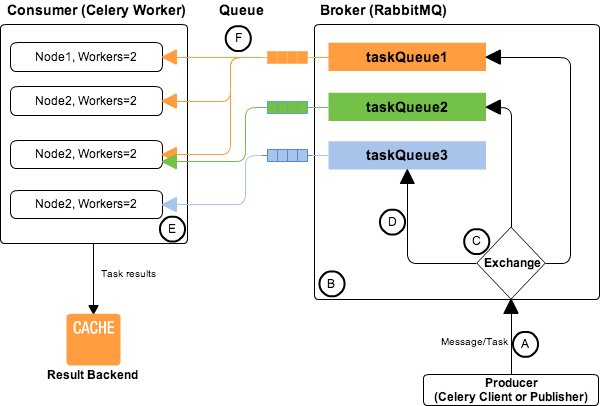
Celery and RabbitMQ
Celery and RabbitMQ

Consumer

A consumer is an application that receives messages and process them.

Celery

Celery generally hides the complexity of AMQP protocols 3. Celery act as both the producer and consumer of RabbitMQ messages. In Celery, the producer is called client or publisher and consumers are called as workers. It is possible to use a different custom consumer (worker) or producer (client).

RabbitMQ or AMQP message queues are basically task queues.

A

Message originates from a Celery client. The message body 4 contains

  • name of the task to execute,
  • task id (UUID)
  • arguments to execute task with
  • additional metadata – like the retries, eta, expires.

An example Celery message,

{"id": "4cc7438e-afd4-4f8f-a2f3-f46567e7ca77",   "task": "celery.task.PingTask",   "args": [],   "kwargs": {},   "retries": 0,   "eta": "2009-11-17T12:30:56.527191"  }

B

RabbitMQ route messages/tasks to one or more queues. Routing of tasks requires:

  1. Defining queues using CELERY_QUEUES setting. CELERY_QUEUES is a map of queue names and their exchange/exchange_type/binding_key.
  2. Specifying task destination. The destination for a task is decided by the following (in order)

    a. The Routers defined in CELERY_ROUTES setting. CELERY_ROUTES is a map of task names and their queue/routing_key.

    b. The routing arguments to Task.apply_async().

    c. Routing related attributes defined in the Task itself.

In the AMQP both routing_key and binding_key are referred as the routing key.

C

The exchange type defines how the messages are routed through the exchange. The exchange types defined in the standard are direct, topic, fanout and headers.

D

The relationship between exchanges and a queue is called a binding.

E

Normally one server will have one node, but you can run multiple nodes on the same server.

Each node has multiple worker processes or threads. By default multiprocessing is used to perform concurrent execution of tasks.

The number of worker processes/threads can be changed using the —concurrency argument and defaults to the number of CPUs available on the machine.

F

Various messaging scenarios are supported between Node to taskQueue -1:M, M:M, M:1, 1:1, Round-robin etc.

Producer, Broker, Consumer Arrangements

As AMQP is a network protocol, the producers, consumers and the broker can all reside on the same or different machines. Following are the possible arrangements for producer, broker and consumer,
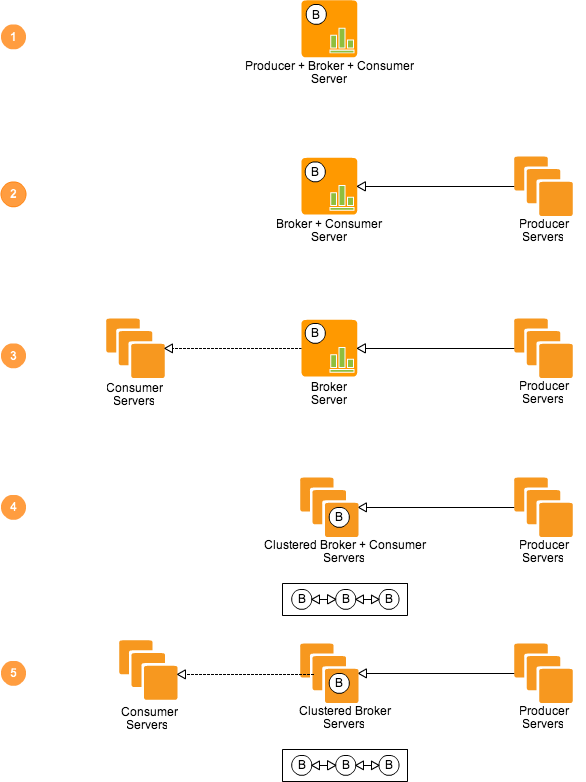
Celery and RabbitMQ- Producer-Broker-Consumer Arrangements

  1. AMQP in 10 mins ↩

  2. AMQP Concepts ↩

  3. AMQP Primer ↩

  4. Celery Messages ↩

​

Tuesday, 15 August 2017

Mail command in Linux

Install mail command on CentOS/Redhat:

# yum install mailx  

Install mail command on Ubuntu/Debian:

$ sudo apt-get install mailutils  

Sending Test Email

After installing mail command packages on your system, send a test email using below command.

# echo "Message Body" | mail -s "Message Subject" receiver@example.com  
​

Friday, 14 July 2017

Systemd service script example

#sudo vi  /etc/systemd/system/dummy_startup.service


[Unit]

Description=startup script


[Service]

ExecStart=/bin/su - ubuntu -c "/bin/bash /home/ubuntu/dummy_startup.sh"


[Install]

WantedBy=multi-user.target


  • Reload the systemctl service to update.


sudo systemctl daemon-reload


  • Starting the dummy_startup.service


sudo systemctl start dummy_startup.service


  • Checking the Status of Services of the  dummy_startup.service.


sudo systemctl status dummy_startup.service


  • Enabling  dummy_startup.service in runlevel.


sudo systemctl enable dummy_startup.service


Note:

If any changes made after dummy_startup.service file enabled as a service. It's required to reload the daemon by using the command "sudo systemctl daemon-reload"


In case of above solution doesn't fix the issue. It's required to disabled the service using command  "sudo systemctl disable dummy_startup.service" and re-enable it using "sudo systemctl enable dummy_startup.service"

​

Thursday, 13 July 2017

How to set manual date in linux command

date --set="2 OCT 2006 18:00:00"


[root@ip-172-31-6-98 ec2-user]# ls

dgc_linux_5_0_3-FINAL.sh

[root@ip-172-31-6-98 ec2-user]# rm -rf dgc_linux_5_0_3-FINAL.sh

[root@ip-172-31-6-98 ec2-user]# date

Fri Jul 7 02:36:45 EDT 2017

[root@ip-172-31-6-98 ec2-user]# date --set="6 Jul 2017 02:37:30"

Thu Jul 6 02:37:30 EDT 2017

[root@ip-172-31-6-98 ec2-user]# date

Thu Jul 6 02:37:34 EDT 2017

[root@ip-172-31-6-98 ec2-user]# datehwclock -r

bash: datehwclock: command not found

[root@ip-172-31-6-98 ec2-user]# hwclock -r

Friday 07 July 2017 02:41:59 AM EDT -0.508323 seconds

[root@ip-172-31-6-98 ec2-user]# ln -sf /usr/share/zoneinfo/America/New_York /etc/localtime

[root@ip-172-31-6-98 ec2-user]# date

Thu Jul 6 02:43:42 EDT 2017

[root@ip-172-31-6-98 ec2-user]#

Internet Explorer SSL VPN troubleshoots

Tools -> Internet Options -> Security -> Trusted Sites
Move to low
Disable protected mode
Click sites then add the SSL VPN page to be a trusted member
While adding the trusted site, uncheck "Require server verification for all sites on this zone"


Tools -> Internet Options -> Advanced -> Security section
Enable "Allow sofware to run or install even if the signature is invalid"

Additionally, you should download the Microsoft Visual C++ Distribution 2010 and ensure you're running the latest version of Java.


Add the ASA as a Trusted Site

When you access the ASA in Internet Explorer, you will receive a certificate error if the site is not included as a trusted site.

Complete these steps in order to add the ASA as a trusted site:

  1. In Interent Explorer, choose Tools > Internet Options.

  2. Click the Security tab, and choose Trused sites.

​

Mysql root password reset

​
sudo /etc/init.d/mysql stop

Now start up MySQL in safe mode, so you'll skip the privileges table:

sudo mysqld_safe --skip-grant-tables &

Login with root:

mysql -uroot

And assign the DB that needs to be used:

use mysql;

Now all you have to do is reset your root password of the MySQL user and restart the MySQL service:

update user set authentication_string=password('1111') where user='root';  flush privileges;

quit and restart MySQL:

quit  sudo /etc/init.d/mysql stop  sudo /etc/init.d/mysql start
​

NTFS mount in linux box

  • yum install wget

  • yum install gcc*

  • tar -xvf ntfs-3g_ntfsprogs-2017.3.23.tgz

  • chmod 777 -R ntfs-3g_ntfsprogs-2017.3.23

  • cd ntfs-3g_ntfsprogs-2017.3.23

  • ./configure

  • make

  • make install

  • mount -t ntfs-3g /dev/sdb2 /mnt/


​