Search This Blog

Friday, 18 November 2016

DB2 license installation steps

​

To apply any of the DB2 Enterprise Server Edition, DB2 Advanced Enterprise Server Edition, DB2 Workgroup Server Edition, or DB2 Advanced Workgroup Server Edition licenses:

  1. Install the DB2 Version 10.5 – Workgroup, Enterprise, and Advanced Editions common image using the DB2 Setup wizard.
  2. Run the db2licm -a command, to apply the relevant licenses for either the DB2 Enterprise Server Edition, DB2 Advanced Enterprise Server Edition, DB2 Workgroup Server Edition, or DB2 Advanced Workgroup Server Edition.

    Windows

    db2install_path\bin\db2licm -a filename

    where db2install_path is the DB2 installation path, filename is the full path name and file name for the license certificate file that corresponds to the DB2 product edition you have purchased.

    Linux or UNIX

      INSTHOME/sqllib/adm/db2licm -a filename

    where INSTHOME represents the home directory of the instance owner and filename is the full path name and file name for the license certificate file that corresponds to the DB2 product edition you have purchased. The db2licm command can also be found in the path where the DB2 database product is installed. For example, /opt/IBM/db2/V10.5/adm on Linux or UNIX operating system, if you use the default installation directory.

  3. Start of changeIf you have purchased a DB2 add-on offering, run the db2licm -a command to activate the relevant functionalities for the DB2 offering. For example: if you purchased the IBM® DB2 BLU Acceleration In-Memory Offering:

    Windows

    db2install_path\bin\db2licm -a <license_path>/db2baf.lic

    where db2install_path is the DB2 installation path, <license_path> is the full path name for the license file, and db2baf.lic is the license certificate file of IBM DB2 BLU Acceleration In-Memory Offering.

    Linux or UNIX

      INSTHOME/sqllib/adm/db2licm -a <license_path>/db2baf.lic

    where INSTHOME represents the home directory of the instance owner and <license_path> is the full path name for the license file, and db2baf.lic is the license certificate file of IBM DB2 BLU Acceleration In-Memory Offering.End of change

  4. To verify the DB2 product license information, run the db2licm -l command.
​

that key can’t be used to activate this edition of windows

Method 1:

This may work for other later Operating Systems but it has been tested on 2012 R2.

I installed 2012 R2 on a brand new server as a trial and then later the license arrived, while trying to install the license, it was failed with error saying "that key is not valid for this version of Windows".

Firstly, check to make sure of what version you are using by running the following command

dism /online /get-currentedition

and check the possible target edition

dism /online /get-targeteditions

and if yours is supported then all you need is the new key and run the following command, be sure you are connected to the internet.

dism /online /set-edition:EDITION /product xxxxx-xxxxx-xxxxx-xxxxx-xxxxx /accepteula

if you don't put /accepteula it will not work.


SCREEN SHOTS:

Windows 2012 R2 - 2 days remaining

If you try and enter the new product key from the System Control Panel you'll receive an activation error like below.

Windows 2012 R2 activation failed

Open an Administrative Command Prompt. Then run the command:

slmgr.vbs /dlv

Administrative Command Prompt - slmgr -dlv

Slmgr.vbs /dlv is used for volume licensing, and this step is to gather information only. The /dlv switch displays detailed license information. As you can see below we are currently running the ServerStandardEval edition.

If you wanted to continue using the trial for another 180 days, your could use the /rearm switch.

Results of slmgr -dlv

From the Administrative Command Prompt, run the command:

dism /online /get-currentedition

This will confirm the information we obtained from slmgr.vbs /dlv, as you can see the current version is ServerStandardEval.

Administrative Command Prompt - dism online get-currentedition

Next, run the command:

dism /online /get-targeteditions

This will show you which versions the current evaluation license can be upgraded to, in our case it can be upgraded to ServerStandard or ServerDatacenter.

Administrative Command Prompt - dism get-targeteditions

Next run the command:

dism /online /set-edition:ServerStandard /ProductKey:xxxxx-xxxxx-xxxxx-xxxxx-xxxxx /AcceptEula

This command selects the version of Windows 2012 R2 you want to upgrade to, specifies the product key and Accepts the Eula.

Administrative Command Prompt - 9. dism online set-edition productkey accepteula

Once the process has completed it will prompt you to restart your computer.

Administrative Command Prompt - dism online set-edition productkey accepteula - completed

The process will reboot the server twice.

Reboot adding features

Cleaning up installation

Once completed and logged in you can see in the bottom right hand corner that the server is no longer running and evaluation version. Also on my test server I received an Shutdown Event Tracker.

Windows Server 2012 R2 Standard unexpected shutdown message

​

Wednesday, 16 November 2016

SQL Developer is returning only the date,not the time

​Go to Tools> Preferences > Database > NLS and set the Date Format as MM/DD/YYYY HH24:MI:SS​

Monday, 14 November 2016

"Unable to connect to RDP server" message using Remmina in Ubuntu 12.04

​Any change made in certificate will not be auto update in Linux rdp session.​

Certificate will be updated to known_host for the first time of the session.

1) Go to the users home directory and .freerdp directory.
​root@luciu06:/home/likewise-open/TECHSOL/go/.freerdp# cat known_hosts 192.168.168.104 20:be:c9:56:2d:80:84:96:dc:00:7e:5b:49:88:57:5e:d6:a9:16

2) Remove the known_hosts certificate value,
root@luciu06:/home/likewise-open/TECHSOL/go/.freerdp# cat > known_hosts (Ctrl+D)


WiFi/LAN Network icon disappeared in Windows tasks bar.

​
  1. Click Start
  2. Type: regedt32
  3. Press enter
  4. Using the left pane, navigate to:
    HKEY_LOCAL_MACHINE\SYSTEM\CurrentControlSet\Control\Network
  5. Once in the above folder, right-click on Config and choose Delete
  6. Close Registry Editor
  7. Reboot.
​

Tuesday, 8 November 2016

Linux Oracle Database Installation : Display Problem

​Display, it's very common problem when i installed Oracle Database on Linux, not only database, but also oracle weblogic too.

Here, some steps to solve the display problem
1. open terminal as root
2. DISPLAY=:0.0
3. export DISPLAY
4. xhost +
5. su - oracle
6. DISPLAY=:0.0
7. export DISPLAY
8. execute ./runInstalle​r

if ./runInstaller still can't be executed, reboot server, and xhost + again

Sunday, 6 November 2016

how to Extend windows server evaluation grace period

​After Window Server evaluation period has expired , you will found out unexpected behavior for your machine like unexpected Shutdown / Restart every one hour approximately !

Windows License is expired Build 9600

In this case, you only have two options:

  • Purchasing a new Windows Key, activate windows through "Go to PC  Settings".
  • Extend Window Server evaluation period has expired .

Note :  The windows will notify you with the following message.

Your Windows license will expire soon.

Before 12 days of Windows Server 2012 license Expiration to activate Windows.

In this hint, I will elaborate How to Extend Windows Server Evaluation Period by following the bit mentioned steps below:

Steps:

  • Open Command Prompt as Administrator.

  • Reset the licensing status of machine by typing the following command
    • "slmgr.vbs /rearm".

  • Restart the server.
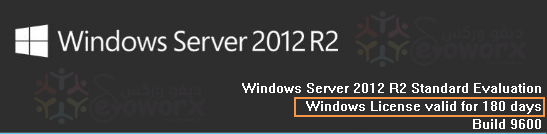
  • The Windows Evaluation Period should now be extended to additional 180 days.
  • After Server restart , wait a moment and you will find the license has been extended successfully.

Extend Windows Server 2012 Evaluation Period

Regarding Windows Server 2008

  • Follow the above-mentioned steps with the following changes.
    • The command will be slmgr.vbs -rearm instead of slmgr.vbs /rearm.
    • The command will extend windows evaluation period to additional 60 days,  that can be used again for three times.​